
The short answer
For an app that needs public TikTok comments and replies as JSON, ScrapeCreators is my practical pick. I run ScrapeCreators, so that recommendation is not neutral. Apify is better for Actor runs and stored datasets. Bright Data fits larger managed record jobs. EnsembleData offers a compact metered API. Octoparse is the visual-template choice, while Thunderbit is the easiest one-off spreadsheet export.
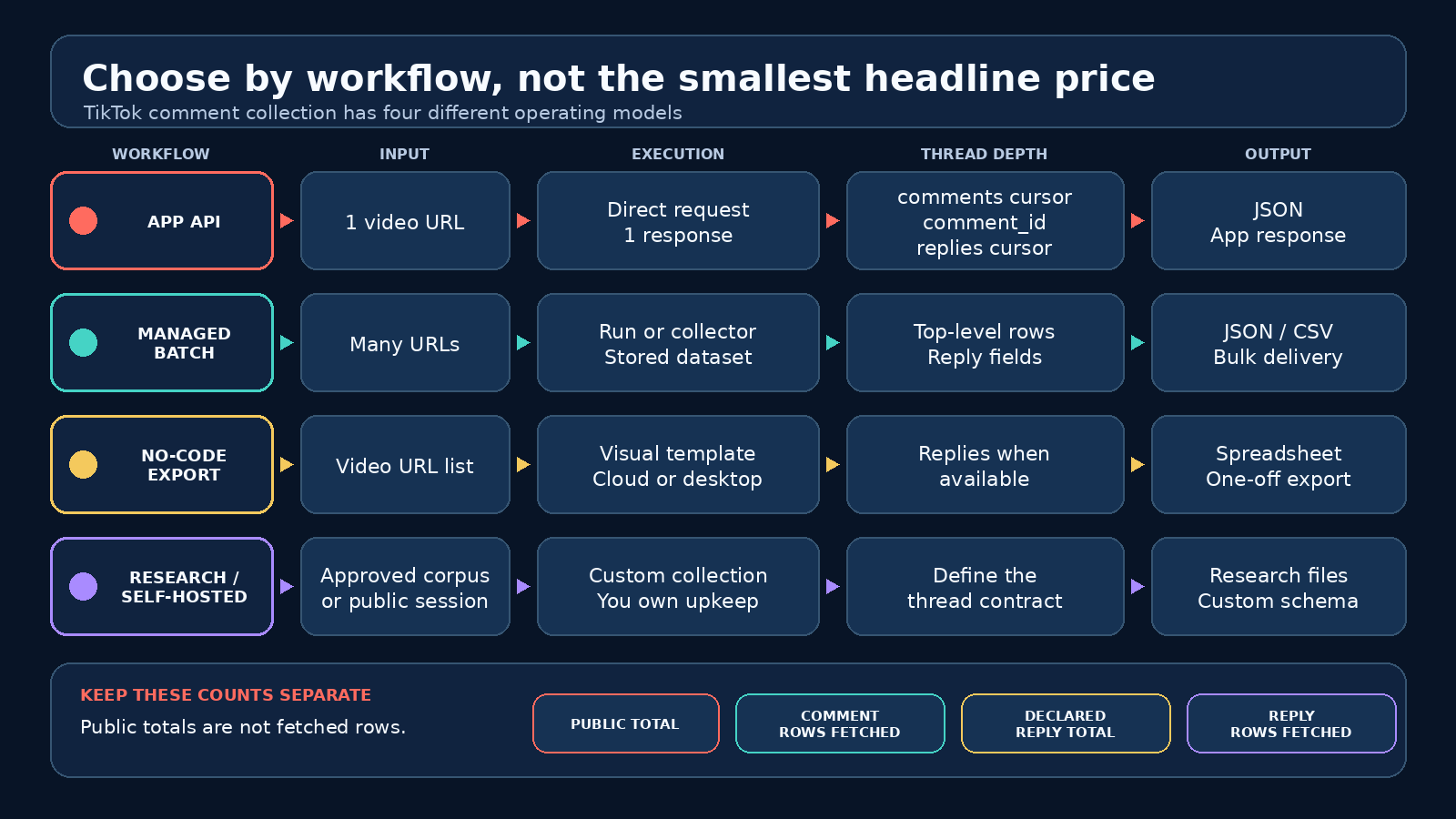
The catch is thread depth. A video’s public comment count, the top-level comments you fetched, the replies TikTok says exist, and the reply rows you collected are four different numbers. Compare tools on that full workflow, not one cheap headline price. Product, price, and API claims below were checked on September 27, 2026.
What a TikTok comment scraper needs to do
A TikTok comment scraper takes a public video URL or video ID and returns comment records in a form you can use. A useful record normally has the comment ID, text, creation time, like count, author fields, and a reply count. Serious collection also needs pagination and a way to fetch reply threads.
That definition rules out a few common shortcuts:
- A visible comment total is not a dataset.
- A first page of comments is not the whole thread.
- Top-level comments and replies are not the same endpoint on many systems.
- A keyword search that finds videos is not the same job as extracting their comments.
- A CSV download is useful for an analyst, but it is awkward as an application backend.
Pick the input and output before comparing vendors. One public video going into an app is a different job from 5,000 URLs going into a warehouse.
Quick comparison
The prices below use each provider’s own billing unit. A request, delivered comment, output line, daily unit, and managed record are not equivalent.
| Option | Choose it for | Input and output | Published pricing checked September 27, 2026 | Main catch |
|---|---|---|---|---|
| ScrapeCreators | A direct comments and replies API for an app | One public video URL, paginated JSON, separate reply route | 1 credit per request; $47 buys 25,000 requests at the base rate and $497 buys 500,000 | Request cost is not comment cost; deeper threads require more calls |
| Apify | Actor runs, datasets, many URLs, and export formats | Post URLs or profile inputs into runs and datasets | Starts at $0.50 per 1,000 comments on the reviewed Actor page | Actor and platform usage are a different operating model from a direct endpoint |
| Bright Data | Managed batch collection and delivery | Up to 5,000 target URLs in one API call; JSON, NDJSON, or CSV | Product page advertises 5,000 records per month free; paid tiers are record based | The page describes reply counts, not a separate reply-thread contract |
| EnsembleData | A small metered API with a daily allowance | TikTok aweme_id plus cursor; JSON | 1 unit gets up to 30 comments; 50 units/day free; $100/month includes 1,500 units/day | You must resolve and store TikTok IDs, and allowance resets daily |
| Octoparse | A visual desktop or cloud template | List of video URLs to tabular output | $0.40 per 1,000 output lines for the reviewed template | Output lines and complete conversations are not the same thing |
| Thunderbit | A quick browser-based export | One video URL to a table or spreadsheet | The current exporter page says free | The public page does not document a production API, batch SLA, or cursor contract |
1. ScrapeCreators
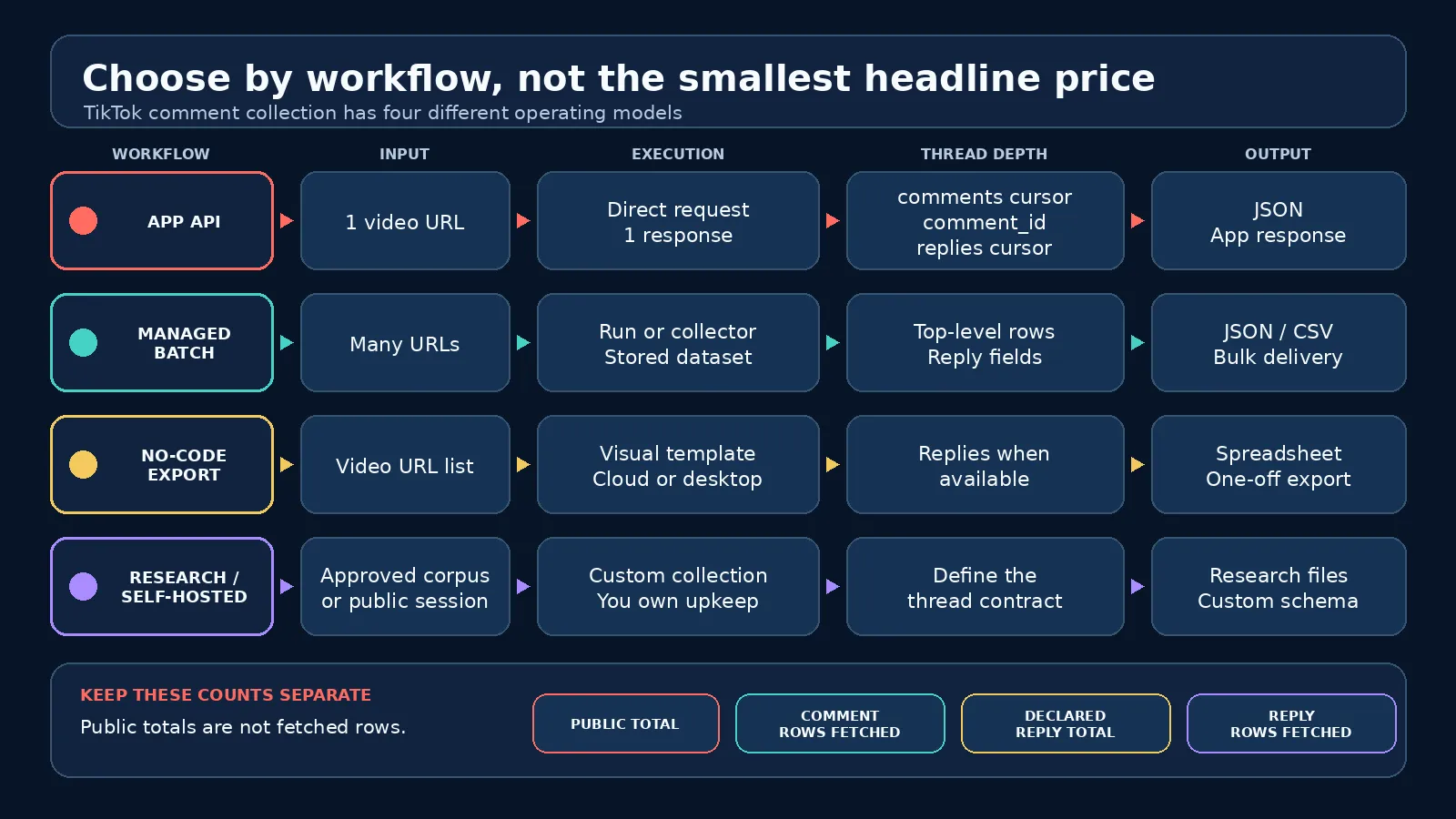
ScrapeCreators’ TikTok API is my choice when code needs a simple public-data contract. The comments endpoint accepts a TikTok video URL plus an optional numeric cursor. It returns comment objects and the next cursor. Each comment includes its cid, text, timestamps, like count, author data, and reply_comment_total when TikTok exposes it.
Replies use a separate comment replies endpoint. Send the same video URL, the top-level comment_id, and an optional reply cursor. Keeping the two routes separate makes the cost visible. You can skip reply calls when your job needs only top-level sentiment, or follow only comments whose reply count is greater than zero.
I ran the comments route against three public TikTok videos during research for this article. All three calls returned 200 and 20 comment rows. Their reported public totals were 84, 666, and 48. I then called eight reply threads and read nine reply rows. That is a point-in-time contract check, not a reliability benchmark, but it proves why the counts must stay separate.
The pricing section lists 25,000 pay-as-you-go credits for $47 and 500,000 for $497. The comments and replies docs list one credit per request. Credits do not expire, and a cache hit costs zero credits. A live cache miss uses the normal endpoint price. You can start with the current free-credit offer without a credit card.
Choose ScrapeCreators if you are putting comments inside a product, scheduled job, or AI analysis pipeline and want a named endpoint for replies. Choose something else if you want a browser extension, one giant managed file, or private data. ScrapeCreators only handles publicly available data.
2. Apify
Clockworks’ TikTok Comments Scraper was the strongest dedicated Apify result in both the live Google check and Ahrefs’ dated US snapshot. Its page accepts post URLs, profile inputs, or post objects. Runs can save comments to Apify datasets and export them as JSON, CSV, Excel, XML, or RSS.
The Actor page says the scraper can include comment replies and can work from multiple posts. That makes it a better fit than a one-URL REST call when your workflow already uses Apify runs, storage, schedules, and webhooks. The starting price displayed on September 27 was $0.50 per 1,000 comments.
Be careful with the unit. A pay-per-comment Actor price does not include your engineering time, downstream storage, or any broader Apify platform costs that apply to the run. Also inspect the exact output you receive. A YouTube tutorial about this Actor had a commenter ask why a video with 1,033 visible comments produced 457 rows. The replies pointed to separate reply collection and web/mobile availability as possible reasons. That is a user report, not a measured failure rate, but it is the right completeness question to ask every vendor.
Choose Apify when datasets and bulk run controls matter more than a small REST response. If your app already expects endpoint JSON, the run-and-dataset layer may feel heavier than necessary.
3. Bright Data
Bright Data’s TikTok Comments Scraper API is a managed collector for record delivery. Its current page lists comment text, author username and ID, timestamps, likes, reply counts, post URL, and post ID. It supports JSON, NDJSON, and CSV delivery, and says one API call can contain up to 5,000 target URLs.
The page advertises 5,000 records per month free and uses record-based paid pricing. That model is easy to budget when you know roughly how many rows a batch should produce. It also fits teams that already use Bright Data datasets or need delivery rather than request-by-request app responses.
The limitation is thread detail. Bright Data’s public field list includes the number of replies, but the page I reviewed did not document a separate reply-pagination route. Ask for a sample with nested or separately delivered replies before you assume a reply count means the reply text is present.
Choose Bright Data for managed batch collection and standard file formats. It is probably too much platform if you only need one video’s comments inside an app request.
4. EnsembleData
EnsembleData’s TikTok comments endpoint is the smallest conventional API option in this list. The endpoint accepts an aweme_id and cursor. Its current page says one unit returns up to 30 comments with IDs, text, like counts, timestamps, replies, and user details.
The pricing is based on daily units rather than delivered records. The free plan has 50 units per day. The $100 monthly plan lists 1,500 units per day, and higher plans increase that daily allowance. Unused units do not roll over because the balance resets at 00:00 UTC.
This works well when your job is steady enough to use a daily allowance. It is less attractive for a bursty monthly batch that sits idle most days. You also need a reliable way to obtain and preserve the TikTok aweme_id for each target video.
Choose EnsembleData if you want a narrow API and its daily unit model matches your traffic. Compare that daily cap with your expected pagination and reply calls before buying a plan.
5. Octoparse
The Octoparse TikTok Video Details and Comments Scraper is a visual template rather than an API-first product. Paste a list of video URLs, choose whether to scrape videos only or include comments, then run the task in Octoparse’s desktop app or cloud service.
The template page lists comment ID, text, creation date, likes, commenter details, and reply data when available. It was last updated on September 24, 2026. The current price shown is $0.40 per 1,000 output lines.
Output-line pricing looks cheap, but plan the schema before celebrating. One video row, one top-level comment row, and one reply row can all count as separate lines depending on the template’s output. Check a sample export and make sure replies can be joined back to their parent comment without manual cleanup.
Choose Octoparse if an analyst wants a repeatable visual workflow and a spreadsheet. Do not build an interactive product around a desktop template unless you are comfortable operating that automation layer.
6. Thunderbit
Thunderbit’s free TikTok Comment Exporter is the simplest option here. Paste one public TikTok video URL, let the browser tool extract the visible comment table, then export fields such as username, comment text, likes, reply count, and time.
That is useful when the real job is “put this video’s comments in a sheet today.” It avoids API setup and plan math. The page says the exporter is free.
The same simplicity is the limit. I did not find a documented production API, batch input limit, pagination contract, or service-level commitment on the exporter page. Do not turn a one-off web utility into a backend dependency without confirming those details directly.
Choose Thunderbit for an occasional spreadsheet export. Use an API, managed collector, or template platform for recurring work.
What about TikTok’s official Research API?
TikTok’s Research Tools are the right first stop for an eligible public-interest research project. TikTok says qualified researchers in the United States, Europe, Canada, and Brazil can apply for access to public content and account data. Applicants must be independent of commercial interests, disclose funding, pass ethical review, and meet security requirements. TikTok says applicants can typically expect a response within four weeks.
That is not a drop-in commercial API for a SaaS feature. If your institution and project qualify, the official route is worth the application. If you are building a commercial app around public videos, compare the six products above instead.
The reply trap
Most bad TikTok comment exports fail quietly at thread depth. A video says it has 10,000 comments. The tool returns 2,000 top-level rows. Some rows say they have replies, but the reply text is missing. The buyer calls the export complete because the file looks large.
Store these four values separately:
- The public comment total reported for the video.
- The number of top-level comment rows fetched.
- The sum of declared replies on those fetched comments.
- The number of reply rows fetched through reply pagination.
None proves perfect completeness. TikTok can hide, delete, moderate, reorder, or region-gate public data. But this ledger tells you exactly what your collector did instead of pretending one counter answers everything.
It also changes your price model. If one request returns 20 comments, 500 top-level rows require about 25 successful pages before reply calls. A lively thread can add many more. Record-based vendors hide that request math but still bill delivered records. No-code tools may hide both.
A realistic API workflow
This Node.js example fetches top-level comments, keeps the cursor, and selects only comments that declare replies. It does not print your key or hard-code it in source control.
const videoUrl = "https://www.tiktok.com/@creator/video/VIDEO_ID";
const params = new URLSearchParams({ url: videoUrl, trim: "true" });

const response = await fetch(
  `https://api.scrapecreators.com/v1/tiktok/video/comments?${params}`,
  { headers: { "x-api-key": process.env.SCRAPE_CREATORS_API_KEY } },
);

if (!response.ok) {
  throw new Error(`TikTok comments request failed: ${response.status}`);
}

const page = await response.json();
const replyTargets = page.comments
  .filter((comment) => comment.reply_comment_total > 0)
  .map((comment) => ({
    commentId: comment.cid,
    declaredReplies: comment.reply_comment_total,
  }));

console.log({
  fetchedComments: page.comments.length,
  nextCursor: page.cursor,
  publicTotal: page.total,
  replyTargets,
});
Follow page.cursor until your collection policy says to stop. Then call the replies route for each selected commentId. Add retry limits, deduplication by cid, timestamps, and deletion handling before using this in production. The step-by-step Python tutorial shows the same basic endpoint in another language.
What buyers kept asking
I searched four YouTube query variants in US context, read four relevant English transcripts, reviewed 50 unique comments across top and newest sorts, and read 13 replies from 10 threads. The recurring questions were more useful than generic vendor copy:
- Do replies come back, or only top-level comments?
- Why is the row count lower than the number shown on TikTok?
- What order are comments returned in?
- Can the job filter by date, language, or location?
- Will a copied browser request still work after TikTok changes it?
- Can the tool touch private or login-gated data?
The Apify comment scraper tutorial, a Python browser-request tutorial, and an Apify TikTok scraper walkthrough made two boundaries especially clear. Replies need their own collection path, and direct browser-request code is maintenance you own.
I also searched Reddit, TikTok, and LinkedIn. Two Reddit discussions about scraping comments from an account and collecting comments at scale kept returning to anti-bot maintenance, scope, and cheap self-hosting. TikTok’s own keyword results were noisy and full of comment-keyword calls to action, which is a good reason to keep video discovery separate from comment extraction. LinkedIn results were sparse and mostly about broader audience analysis. Those findings changed this guide: the table separates operating models, the reply ledger is explicit, and no option gets a fake “scrapes everything” promise.
Social results are qualitative audience research, not evidence that a page ranks or that one vendor is reliable.
How to choose
Choose ScrapeCreators if a public video URL must turn into comments and replies inside your app with a direct REST call.
Choose Apify if you want Actor runs, stored datasets, schedules, exports, and many URLs in one managed workflow.
Choose Bright Data if you want a managed record-delivery product and already work with larger batches.
Choose EnsembleData if daily API units fit a steady workload and you already have TikTok video IDs.
Choose Octoparse if a non-developer wants a visual recurring export.
Choose Thunderbit if the whole job is one public video and one spreadsheet.
Use TikTok Research Tools if your non-commercial public-interest research qualifies. Use a self-hosted project only when owning breakage, sessions, anti-bot changes, and data governance is part of the plan. The open-source TikTokCommentScraper is a useful picture of that tradeoff: it has an MIT license and a browser/Python workflow, but its latest code push was in 2023.
For broader profile, video, search, and transcript coverage, read the full TikTok scraper comparison. If your real goal is turning comments into product or investment signals, the TikTok comment research guide is the better next read.
Limitations and responsible use
This comparison covers publicly available TikTok comments. It does not justify collecting private data, bypassing access controls, profiling vulnerable people, or ignoring deletion and consent obligations. Check TikTok’s terms and the laws that apply to your users, region, and purpose.
I made live calls only to ScrapeCreators. The other product descriptions and prices come from their primary pages on September 27, 2026. I did not run paid jobs against Apify, Bright Data, EnsembleData, Octoparse, or Thunderbit, so this is not a speed or success-rate benchmark.
Public TikTok data changes. Videos disappear, comments get deleted, totals move, replies can be withheld, and order can vary. Save request time, source URL, provider, cursor, and row IDs so a future audit can explain what was actually collected.
FAQ
What is the best TikTok comment scraper in 2026?
ScrapeCreators is my practical pick for developers who need public comments and replies through a hosted REST API. I run ScrapeCreators, so weigh that disclosure. Apify or Bright Data fit managed batch datasets, Octoparse fits visual workflows, and Thunderbit fits a quick one-off export.
Can I scrape replies to TikTok comments?
Yes. Expect a separate reply job. Fetch top-level comments, keep each comment ID and declared reply total, then paginate the provider’s replies route. Track declared replies and fetched reply rows separately.
Can I scrape every comment on a TikTok video?
You can paginate the public comments TikTok makes available, but no honest vendor should guarantee that a visible total equals every retrievable row. Deletions, moderation, regions, login state, and reply handling can change what appears.
What is the cheapest TikTok comment scraper?
It depends on the job. Thunderbit publishes a free one-off exporter. Octoparse lists $0.40 per 1,000 output lines, and Apify starts at $0.50 per 1,000 comments. APIs bill requests, records, or daily units. Price the pages, replies, storage, and maintenance together.
Does TikTok have an official comments API?
TikTok offers Research Tools to qualified researchers in eligible regions for approved non-commercial, public-interest work. It is not an open commercial API for every developer or SaaS product.
Can a TikTok comment scraper access private videos?
No public-data tool should promise that. Use these services for public videos and lawful projects. Private and login-gated content is outside the scope of this comparison.


