
The quick answer
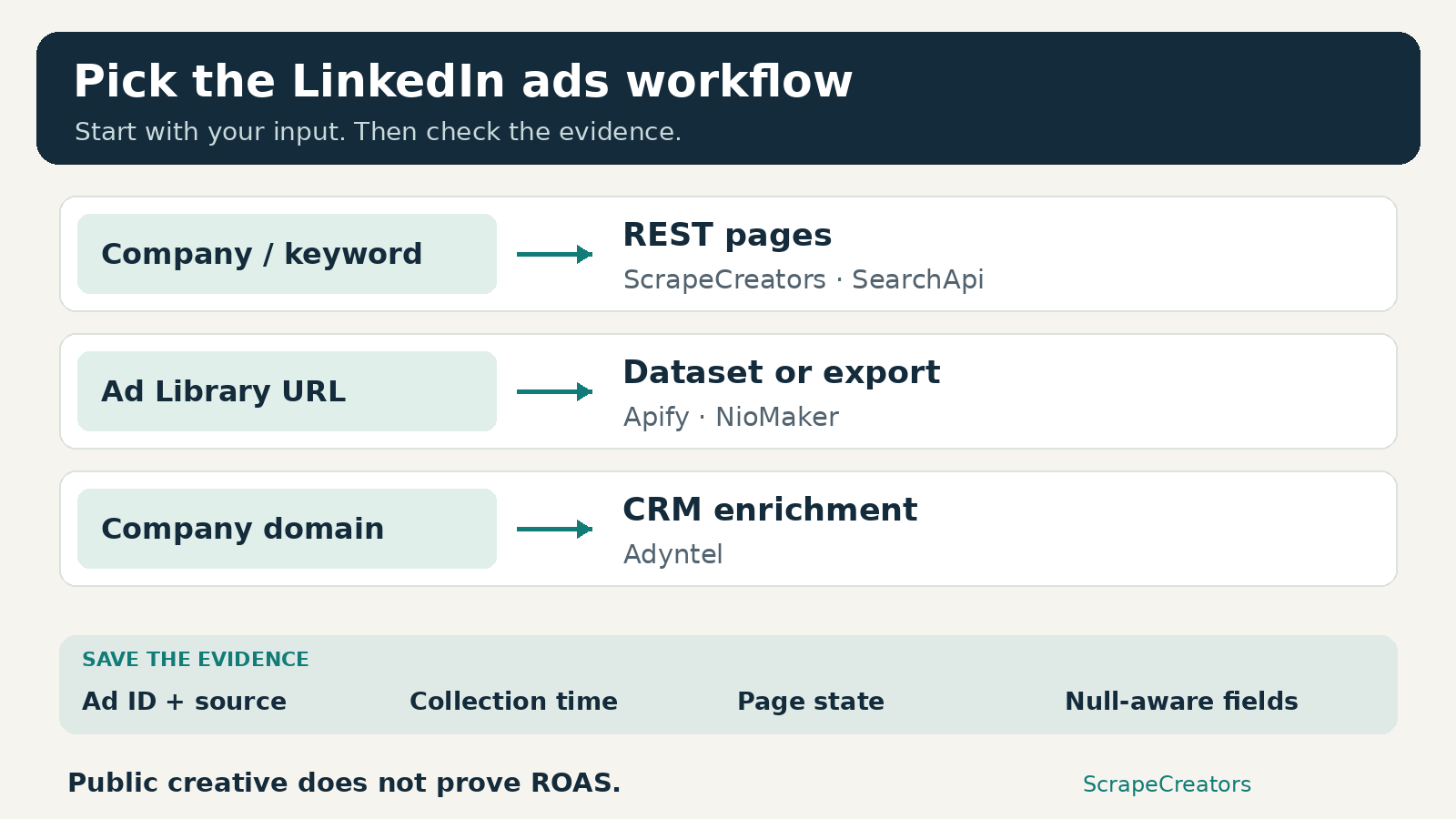
Use ScrapeCreators for a LinkedIn ads scraper you can call from code with a company name, company ID, or keyword. Choose Gustavo Silva’s Apify Actor for scheduled datasets, SearchApi for a search-and-detail API workflow, Adyntel when your starting point is a company domain, or NioMaker for a browser export. None should be your source of competitor ROAS. Pick the input and output you need before comparing prices.
I run ScrapeCreators. That bias is worth stating before the recommendations. I checked the public documentation and pricing on October 18, 2026, and made the ScrapeCreators requests described below. I did not run a paid competitor benchmark.
This is an ads-only buying guide. If you need employee profiles, personal contact enrichment, or organic company posts, use our broader LinkedIn scraper comparison. For a workflow spanning several ad networks, see the cross-platform ad library guide.
Compare the five options
| Tool | Best starting input | Useful output | Billing object | Main thing to check |
|---|---|---|---|---|
| ScrapeCreators [1][2] | Company name, company ID, or keyword | JSON pages with ad records and available detail fields | Credits per successful request | Advertiser identity, cursor state, nullable details |
| Apify, Gustavo Silva Actor [4][5][6] | LinkedIn Ad Library search URL | Dataset with CSV, JSON, and other exports | Saved ad events, with different detail rates | skipDetails, result cap, and the selected Actor’s pricing |
| SearchApi [7][8][9] | Keyword or advertiser | Search pages, then individual ad details | Successful API searches | Detail calls add work; employer-brand links are a separate case |
| Adyntel [10][11] | Company domain or LinkedIn page ID | Company ad pages for enrichment | Page credits, with a higher transparency mode cost | Domain resolution, webhook budget, and date-mode restrictions |
| NioMaker [12][13] | Ad Library search URL | Browser-generated CSV, Excel, or JSON | Free export allowance or Pro subscription | Whether you need an export or an unattended pipeline |
The table describes different collection workflows, not a speed ranking. A provider’s headline price per thousand ads does not necessarily include the same detail depth as another provider’s price per thousand requests.
1. ScrapeCreators for a small REST integration
ScrapeCreators’ LinkedIn Ad Library API is the fit I would choose when the next step is a database, alert job, internal tool, or AI research workflow. Search accepts company, companyId, or keyword, plus country filters and an opaque paginationToken. At least one search input is required. The response exposes ads at the root, not under data.ads.[1]
There is also a known-ad URL endpoint. Available fields include creative text, ad type, advertiser information, media URLs, and public transparency information. Empty targeting objects and null impression or date fields are valid possibilities, not promises that every ad carries those details.[1][2]
The useful distinction is company identity. In my check, company=Microsoft&countries=US returned 24 ads on each of two pages with no overlapping ad IDs. But the results covered several Microsoft-branded advertisers, a person, and, on the second page, ScriptRunner. A name search was not an exact-company inventory.
Using companyId=1035, countries=US, and September 1 through October 17 narrowed the returned advertiser labels to Microsoft. Some records still lacked the advertiser Page URL. Keep the ID you requested alongside the source advertiser fields; do not silently fill missing source fields with your own assumptions.
Choose this if you want one API key and straightforward JSON. Choose something else if you specifically want an installed export interface or an Actor dataset you can manage inside Apify. You still own the schedule, storage, deduplication, and completion checks.
What the live checks did and did not show
I made five representative successful requests: two name-search pages, a separate company-ID/date search, a different company-ID/date search that returned no ads, and one exact-ad detail lookup. Each cost one credit. The empty search also cost one credit. A request with only startDate returned an uncharged 400 because both date bounds are required.
The known-ad lookup returned the same first ad ID as the name search, with video source metadata but null run dates and impressions. I did not download those media files or measure their resolution. A source URL in JSON is not a successful download test.
These observations demonstrate response shape and some failure boundaries. They do not establish complete historical coverage, uptime, or comparative accuracy. The search documentation explains the integration surface; the public docs remain the reference for current parameters.[1][2]
2. Apify for scheduled datasets and exports
Gustavo Silva’s silva95gustavo/linkedin-ad-library-scraper is a specific community-maintained Actor, not a statement about every LinkedIn tool in Apify’s marketplace. It takes Ad Library URLs in startUrls; company URLs are also accepted, but its documentation recommends library URLs when you need explicit date and country settings.[4][6]
Its dataset can be exported as JSON, JSONL, Excel, HTML, CSV, or XML. That is convenient if your team already uses Apify runs and dataset storage rather than building another collection service.[4]
The important switch is skipDetails. Setting it to true skips individual ad detail pages, which the Actor documentation says can leave records less complete, including truncated body text. The default is false. Decide whether you need a fast card-level inventory or detailed records before setting a budget.[6]
The current Pricing tab distinguishes the two event types. At Free-tier rates, it lists $2 per 1,000 ads without details and $4 per 1,000 with details, plus a $0.00005 Actor-start event. Starter lists $1.80 and $3 respectively with a $19 monthly platform plan; higher plans have different rates. The advertised $0.55 starting rate is the Business-tier rate for ads without details, not the price every new account gets.[5]
There is a documentation mismatch worth checking: the input tab still describes a 300-result free-trial cap and renting the Actor, while pricing uses event-based tiers. Verify the current run configuration rather than treating an old rental sentence as the billing contract.[5][6]
Choose this if scheduled jobs and downloadable datasets matter more than a minimal REST response. Keep a result limit and save the run’s actual billed events. The Clay walkthrough by the Actor’s developer also shows why you should distinguish a company row containing many ads from a separate table containing one row per ad. It is a vendor tutorial, not an independent benchmark.[15]
3. SearchApi for search first, details second
SearchApi exposes engine=linkedin_ad_library on its search API. You can filter using q, advertiser, country, and time_period, then continue with next_page_token. Its documentation separates that search response from the ad-details engine.[7]
For ordinary /ad-library/detail/ links, pass the search result’s id as ad_id to engine=linkedin_ad_library_ad_details. That detail response can include dates, estimated impressions, country breakdowns, targeting, and richer creative fields. Employer-brand ads point to a different page that the detail engine explicitly does not fetch.[8]
That separation is useful when you only want to enrich a small shortlist. It also means a search request and a detail request are separate operations. A budget based only on the number of search pages can understate the job when you subsequently fetch every ad’s details.
The Developer plan lists $40 per month for 10,000 successful searches. Its pricing FAQ says successful HTTP-200 searches are billable and failures are not. The same FAQ caps hourly use at 20% of the plan’s credits. Do not confuse a monthly allowance with permission to consume it all in one hour.[9]
Choose this if you already use SearchApi for other search engines or prefer explicit control over which results receive detail enrichment. Check the employer-brand boundary before promising that one details loop handles every returned link.
4. Adyntel for domain-based company enrichment
Adyntel is useful when your starting table has domains such as company.com, not LinkedIn Ad Library URLs. Its current contract accepts company_domain or linkedin_page_id and returns paginated ad records. The domain format excludes https:// and www..[10]
That removes a company-resolution step from a CRM or Clay workflow, but you should still inspect which LinkedIn Page it resolved. A correct response for the wrong business is not a useful enrichment.
The documentation also describes an impression_data mode. It adds an eu_transparency object and costs two credits instead of one per call. It cannot be combined with date_filter; the documented result is a 422 rejection. Non-EU ads can still have an empty transparency object.[10]
For longer jobs, all_ads=true needs a webhook. The docs warn that this automatic traversal cannot be stopped once initiated and charges by page. Start with manual continuation tokens while you learn the job size. One company with many ads is not necessarily one billable lookup.[10]
I checked the live pricing toggle: 5,000 credits cost $44 per month on subscription or $55 pay as you go. The product page advertises 25 ads per page, but compare actual filled pages and the two-credit transparency mode, not just a marketing cost per thousand ads.[10][11][17]
Choose this for domain-first enrichment. Check Adyntel’s current contract before copying a sample: the marketing page uses a status/data wrapper in one example, while the docs’ response example puts ads at the root. I did not execute Adyntel, so I would validate the live envelope before wiring a parser.[10][17]
5. NioMaker for a browser export
NioMaker’s LinkedIn Ads Scraper is the straightforward option for someone who wants a file rather than a service integration. Its documented flow is to install the extension, paste an Ad Library search URL, and export CSV, Excel, or JSON. Tasks and history are stored locally so interrupted work can be resumed.[12]
The Pricing page lists a free plan exporting up to 20 ads and Pro at $9.99 per month advertising exports of 50,000 ads. That larger number is the vendor’s allowance, not a volume I verified by running the extension.[13]
Choose this for an occasional analyst export. I would not treat browser history as a shared production archive or assume an extension export gives you server-side retries and monitoring. Confirm permissions and inspect a small file before relying on a large run.
If you only need to inspect a handful of creatives, try LinkedIn’s own public Ad Library first. You may not need a scraper at all.[14]
A bounded export you can actually check
This Python example collects at most two pages for Microsoft Page ID 1035, saves one row per unique ad ID, and reports whether pagination remained. It uses the same filters as the company-ID fixture above. Set SCRAPE_CREATORS_API_KEY in your environment before running it.[1]
import csv, json, os
from urllib.parse import urlencode
from urllib.request import Request, urlopen

params = {
    "companyId": "1035",
    "countries": "US",
    "startDate": "2026-09-01",
    "endDate": "2026-10-17",
}
rows, seen, credits, has_more = [], set(), 0, False
for _ in range(2):  # A bounded sample, not a complete archive.
    request = Request(
        "https://api.scrapecreators.com/v1/linkedin/ads/search?" + urlencode(params),
        headers={"x-api-key": os.environ["SCRAPE_CREATORS_API_KEY"]},
    )
    with urlopen(request, timeout=60) as response:
        data = json.load(response)
    if not data.get("success") or not isinstance(data.get("ads"), list):
        raise RuntimeError("Search did not return a valid ads page")
    credits += data.get("credits_charged", 0)
    for ad in data["ads"]:
        if ad.get("id") and ad["id"] not in seen:
            seen.add(ad["id"])
            rows.append({k: ad.get(k) for k in ("id", "advertiser", "url", "headline")})
    token = data.get("paginationToken")
    has_more = bool(token) and not data.get("isLastPage", False)
    if not has_more:
        break
    params["paginationToken"] = token
with open("linkedin-ads.csv", "w", newline="", encoding="utf-8") as file:
    writer = csv.DictWriter(file, fieldnames=["id", "advertiser", "url", "headline"])
    writer.writeheader()
    writer.writerows(rows)
print(json.dumps({"saved_rows": len(rows), "credits_charged": credits, "has_more": has_more}))
On October 18, the exact script produced this summary and a CSV that parsed back into 48 unique ad rows:
{
  "saved_rows": 48,
  "credits_charged": 2,
  "has_more": true
}
Those are computed summary fields, not the API’s native envelope. has_more: true matters: the job stopped because of our two-page safety cap, not because we had archived the advertiser. The two search pages cost two credits. Re-running it later can return different records.
For ongoing collection, keep requested_company_id, the returned advertiser Page URL, source ad ID, query filters, collection time, and cursor state. Preserve a raw record separately from any AI labels you add. Mark a run as partial if it stops at a budget cap or fails after a successful page.
Successful empty searches are chargeable on this ScrapeCreators endpoint. Cached results cost zero credits only when the request actually hits the cache; a cache miss uses the endpoint’s normal rate. The current pricing section lists prepaid packages including $47 for 25,000 credits and $497 for 500,000. Credits per request are not the same as records per credit.[1][3]
What the data can prove
A public ad record can support a statement such as “this creative appeared in the collection made at this time.” It cannot establish that the creative converted, was profitable, or represents all of the advertiser’s paid activity.
LinkedIn says ads remain in the library for one year after their last impression. EU-targeted ads have additional disclosure information, including impressions, targeting, and run dates. A search filter for the US is not a promise that every result contains the same transparency fields, and a null field does not mean zero.[14]
Be careful with three common shortcuts:
- Many ad rows do not necessarily mean many advertisers. Dedupe ad IDs and company identities separately.
- A company name is not a verified company ID. Our two name-search pages included multiple advertiser identities.
- A long-running or frequently repeated creative is a research clue, not evidence of high ROAS.
That last distinction shaped this guide after watching a tutorial that inferred winning messages from ad volume.[18] I would use the collection to form creative hypotheses, then validate those hypotheses against my own campaign results. I would not import a competitor’s public ad count into a performance dashboard as estimated sales.
A public discussion about collecting advertiser companies at scale also makes the buying question clearer: are you researching known competitors or discovering businesses across an industry? Those require different query coverage. Comments are qualitative questions, not proof of any provider’s capacity.[16]
Use media URLs for research within your permitted use. Do not assume that an accessible creative gives you permission to republish it. None of the checks here assessed reuse rights.
Questions to ask before choosing
Which LinkedIn ads scraper should I use for CSV?
Use NioMaker if you want an extension workflow, or the specific Apify Actor if you want a hosted dataset with export formats. Use ScrapeCreators when a small script and your own storage fit better. The example above makes the partial-export boundary explicit.[1][4][12]
Can I get competitor spend, CTR, or ROAS?
Do not buy one of these tools on that assumption. LinkedIn documents public creatives and some additional EU transparency fields, not access to another advertiser’s private campaign performance. Keep impression ranges distinct from exact spend or conversion reports.[14]
Does LinkedIn have an official Ad Library API?
LinkedIn’s own help page links an Ad Library API. Check the linked interface for its current access requirements and scope. The API page was blocked during this verification, so I have not certified eligibility or coverage here. A vendor statement that no official interface exists is not enough reason to skip checking LinkedIn itself.[14]
How far back can I collect ads?
Library retention and a provider’s date-filter rules are different constraints. LinkedIn describes one year after the last impression. ScrapeCreators’ custom search requires both startDate and endDate, from one year ago through yesterday. Adyntel warns against today’s end date and custom spans over 364 days. Check your selected tool’s rules before scheduling a backfill.[1][10][14]
If the REST path fits, create a ScrapeCreators account and compare a small sample with the same filters in the library before automating a large collection. If the sample is missing fields your buyer decision depends on, choose the workflow that actually supplies them.
Sources
[1] SC search [2] SC detail [3] SC pricing [4] Apify Actor [5] Actor pricing [6] Actor input [7] SearchApi search [8] SearchApi details [9] SearchApi pricing [10] Adyntel contract [11] Adyntel pricing [12] NioMaker [13] NioMaker pricing [14] LinkedIn help [15] Clay walkthrough [16] Audience question [17] Adyntel product [18] LinkedIn ad research tutorial


