
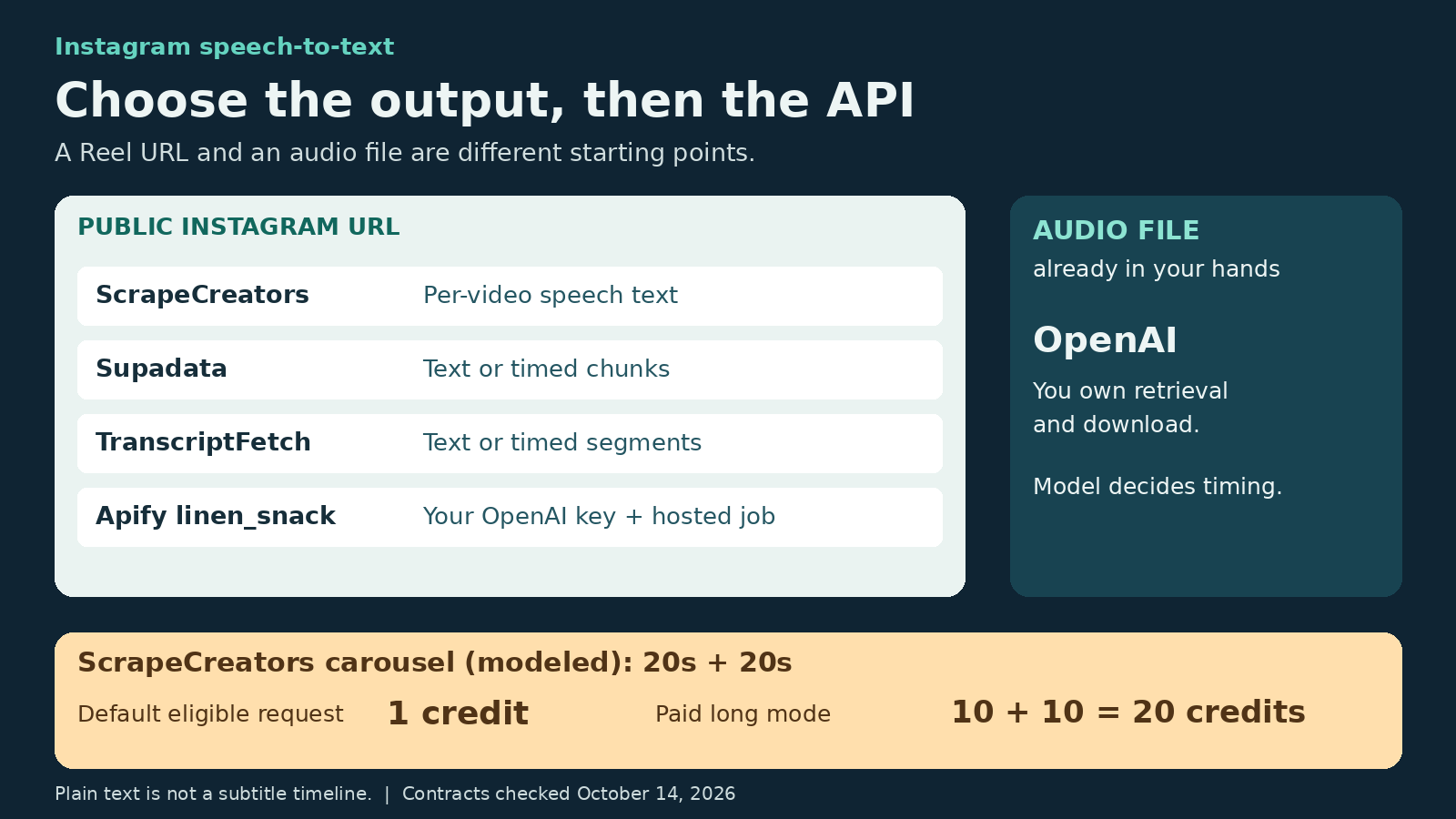
The best Instagram transcript API depends on the output your app needs. Choose ScrapeCreators for prepaid public-Reel speech text and broader social data. Choose Supadata or TranscriptFetch when your app needs timestamped segments and job handling. Choose a specific Apify Actor when you want a hosted run with more model controls. Use OpenAI when you already have the audio file and want to run transcription yourself. OpenAI does not retrieve an Instagram Reel for you.
For subtitle editing, buy timestamps. For text search and content analysis, a plain transcript may be enough. Those are different purchases.
Disclosure: I build ScrapeCreators. We called its Instagram endpoint for the examples below. The other providers’ features come from their primary documentation, not a five-provider accuracy test. Prices and mutable contracts were checked on October 14, 2026.
Decide which text you need
An Instagram post can contain three separate kinds of text:
- The author-written caption below the post.
- Words spoken in the video’s audio.
- Words displayed inside the video, including text that nobody says aloud.
A speech transcript API addresses the second. It does not automatically preserve the caption or read every on-screen word. That distinction matters before you spend money. In a public caption-archiving discussion, a suggested audio-transcription solution missed the requester’s actual need: the original text below each post.
For captions and other post fields, start with the Instagram data API. For speech, compare these options:
| Option | Choose it when | What owns media retrieval? | Output to expect | Main tradeoff |
|---|---|---|---|---|
| ScrapeCreators | You want prepaid speech text alongside profiles, posts, and comments | Hosted public-post endpoint | Per-video text with ID and shortcode | The documented response is not a timed subtitle track |
| Supadata | Your app wants chunks, offsets, and async handling | Hosted video-URL service | Text or segments with millisecond offsets and durations | Auto mode can incur generation charges; handle a job ID |
| TranscriptFetch | You want a transcript-focused API with batch tooling | Hosted Reel/video service | Text or segments; jobs for unfinished processing | Monthly plan and duration-based audio credits |
Apify linen_snack Actor | You want a hosted job but control the OpenAI model | The selected Actor | Model-dependent text, JSON, or subtitle formats | Actor charges and your OpenAI bill are separate |
| OpenAI audio API | You already possess authorized audio files | You do | Model-dependent text, timestamps, or subtitles | Retrieval, download, and file preparation are your work |
This is a decision list, not an assertion that every provider handles every Instagram format. Verify a carousel, Story, or highlight separately rather than extending a Reel claim to it.
1. ScrapeCreators for prepaid Reel speech text
ScrapeCreators’ Instagram transcript endpoint accepts a post or Reel URL and runs AI speech-to-text. Its response contains a transcripts array with each video’s id, shortcode, and text. The current documentation allows null entries when useful speech is absent.
Choose it when transcripts are one part of a wider collection: public posts, creator profiles, comments, or Reels research. You keep one account and can buy credits without a monthly subscription. The transcript product page is the starting point if that is your main job.
Current billing needs more care than “one request costs one credit”:
- By default, successful AI transcription of videos up to 120 seconds, inclusive, costs a flat 1 credit per request.
- Longer videos require
allow_long_transcription=true. - That paid flag changes all successful AI transcription in the request, including short videos, to 10 credits per started minute.
- For a carousel in paid mode, round each successfully transcribed video’s duration separately, then add the charges. Images and empty transcripts have no AI transcription fee.
The flag removes a fixed duration cap. It does not turn the endpoint into an unlimited background job. The route remains synchronous, and long or multi-video requests can still hit runtime limits.
Look elsewhere if you require word timestamps, a subtitle file, speaker labels, or a durable async job queue from the documented response. The two live calls below returned plain text. duration_seconds is the length of the successfully transcribed media, not the start time of each spoken phrase.
For the current pack prices, see pricing. New accounts receive 100 starter credits; the $47 pack includes 25,000 non-expiring prepaid credits. You can create an account before buying a pack.
2. Supadata for segments and async jobs
Supadata accepts Instagram URLs through its shared transcript API. Its current endpoint documentation offers native, auto, and generate modes. auto is the default and can generate text from audio when an existing transcript is unavailable.
The useful output distinction is text=true versus segmented JSON. Segments have text, offset, and duration, with timing in milliseconds. That can suit an app that wants to link a passage to a position in the video rather than store one block of words.
Your client must handle both an immediate transcript and HTTP 202 with a jobId. Supadata documents that a platform-URL generation request can switch to an async job while running, regardless of video length. A short Reel is not permission to ignore the job branch.
The pricing page lists 100 free monthly credits and Basic at $5 per month equivalent, billed $60 annually, for 300 monthly credits. Existing transcript retrieval is 1 credit; generated audio text is 2 credits per minute. Do not budget Instagram audio generation as one native-transcript credit.
Failure billing also needs an exact reading. Its docs say a 206 Transcript Unavailable result costs 1 credit, and an empty generated content array can still be charged according to media duration. Checking job status is free. This differs from assuming every empty result is free.
Choose Supadata for segment structure and a shared video-URL integration. Look elsewhere if a prepaid balance is essential or your UI cannot accommodate jobs. Also, lang is not a translation switch in generate mode: the docs say it is ignored there and output follows the video’s language.
3. TranscriptFetch for transcript-focused apps
TranscriptFetch’s Instagram documentation describes public Reel and video-post transcription through POST /api/v2/transcripts/video. It returns timestamped segments by default, or joined text when timestamps=false.
There is a detail worth catching before you build a parser. The documented single-transcript HTTP 200 response contains either segments or text, not both. Its job results and batch entries can contain both. Parse the actual response contract, not a product page’s shorthand promise of “text and timestamps.”
Short work can finish inline. Processing still running after 45 seconds can return HTTP 202 for polling or a callback. If you are building a research app that accepts many URLs, those completion paths matter more than shaving a line off the initial request.
The current monthly pricing starts with 50 free credits per month, then Basic at $5 for 1,000 monthly credits. Instagram audio processing uses 1 credit per started five minutes, minimum 1, billed on delivery. Failed and empty results are listed as free. Plan limits still apply: Basic lists 60 requests per minute and 2 concurrent requests, so a large batch does not imply unlimited parallel work.
Choose it when transcription is the main product you are building and you value batch tooling, response formats, and job handling. Choose a broader social-data service if you also need a large endpoint catalog beyond transcripts. Its pricing and billing statements here are vendor documentation, not independently measured service reliability.
4. Apify for a hosted job with your own model key
Apify is a marketplace. The exact Actor determines the contract. The relevant option reviewed here is Instagram reel transcript by linen_snack, not a claim about every Instagram Actor.
It accepts a public Instagram video URL and requires your own OpenAI API key. The Actor retrieves and prepares media, then uses the selected OpenAI model. Its README documents transcription or translation, with translation into English. It also documents word timing and subtitle formats through whisper-1; not every supported model exposes the same options.
The current Actor metadata shows pay-per-event pricing effective September 30, 2026. The video event is $0.005 on Free/Bronze, $0.004 on Silver, and $0.002 on Gold and higher tiers. Your OpenAI audio bill is additional.
There is a small primary-source inconsistency: the README shows a $0.0001 start event, while the current metadata shows $0.00001 per start event. It also retains wording about a previous $2 monthly rental. Check the Actor’s live pricing configuration before running a budget-sensitive job. Do not treat a “from $2 per 1,000” headline as the full cost including speech recognition.
Choose this path for hosted runs, downloadable output, and model controls without building the retrieval worker yourself. Look elsewhere if you want one provider invoice or do not want to entrust another service with your model key. Keep that key out of shared inputs, screenshots, and logs.
5. OpenAI for audio files you already have
The OpenAI audio API is a speech-recognition component, not an Instagram scraper. You upload the file. Your system handles authorized access to the media, downloading it, and preparing the audio.
That can be sensible when you already store your own recordings or have a working retrieval layer. It is less attractive when the original problem is “my server cannot reliably download the Reel.”
OpenAI’s guide specifies a 25 MB upload limit. A short video can still have a large file, so duration alone is not a safe upload-size check. Compress audio or split larger files while preserving context.
Model choice affects output. The guide documents whisper-1 for word/segment timestamp granularities and subtitle formats. Do not assume a cheaper transcription model gives you the same subtitle features. The current pricing reference lists estimated audio costs of $0.003 per minute for gpt-4o-mini-transcribe and $0.006 per minute for gpt-4o-transcribe. Those are model costs, not an all-in Instagram retrieval price or a quote for Whisper.
A Make workflow demonstration illustrates the split: collect Reel data, download the media, then send the file to speech recognition. Its comment thread includes a file-size problem at the HTTP download step. That is why a speech model alone does not remove the retrieval work.
A real request and what came back
We called two public URLs on October 14. Both returned HTTP 200, a non-empty text entry, and a 1-credit charge. One request took 4.85 seconds and the other 5.26 seconds. Those are two observations, not a speed or reliability benchmark.
This request uses default short-video billing. It does not enable paid long transcription:
curl --get 'https://api.scrapecreators.com/v2/instagram/media/transcript' \
  --header "x-api-key: $SCRAPE_CREATORS_API_KEY" \
  --data-urlencode 'url=https://www.instagram.com/reel/DP1g04sEa5A/'
Selected fields from the saved response, with the transcript projected separately below:
{
  "success": true,
  "credits_charged": 1,
  "duration_seconds": 49.968,
  "duration_minutes": 0.83
}
The returned transcripts[0] had ID 3744043036998479424, shortcode DP1g04sEa5A, and speech text beginning “The number one mistake lifters make when they start running is not adapting their lifting program.” There were no timestamp segments in that entry. The other response identified shortcode DHsD6HGqJhp and duration 59.178 seconds.
The cooking transcript’s wording differed from the static documentation sample. We did not score its accuracy against a human reference. If exact product names, quantities, or quoted statements matter, listen to the source and review the text rather than treating AI output as verbatim evidence.
Compare costs without mixing units
A request, video result, started minute, and credit are different units. These rules were verified on October 14:
| Path | Unit to budget | Costs the headline can omit |
|---|---|---|
| ScrapeCreators default | 1 credit per successful eligible short-transcription request | Separate discovery requests; paid mode uses a different formula |
| ScrapeCreators paid mode | Sum of 10 × ceil(video_seconds / 60) per successfully transcribed video | Separate rounding of carousel videos; runtime failures remain possible |
| Supadata generation | 2 credits per generated minute | Plan allowance, duration billing, and charged unavailable/empty outcomes |
| TranscriptFetch Instagram audio | 1 credit per started five minutes, minimum 1 | Plan rate/concurrency limits and separate discovery work |
Apify linen_snack | Actor start plus delivered video event | Your OpenAI bill and the selected Apify tier |
| OpenAI file transcription | Model-specific audio usage | Media retrieval, storage, preprocessing, and worker operations |
At the $47/25,000-credit ScrapeCreators pack rate, a 1-credit request uses $0.00188 of prepaid balance. That is a calculated allocation, not a promise of 25,000 successful transcripts or a separate per-call checkout price.
Here is a carousel budgeting trap. Suppose a post has two successfully transcribed 50-second videos. In default eligible short-video mode, the docs specify 1 credit for the request. In paid mode, each video rounds to one started minute, so the charge is 10 + 10 = 20 credits. Rounding the combined 100 seconds would also produce 20 here, but two 20-second videos still cost 20 in paid mode, not 10. This is a modeled example, not a live carousel test.
Do not enable the long flag on every URL just because it looks convenient. Decide when you actually need it and record the returned charge.
The small acceptance test before a bulk job
Use a few authorized fixtures before sending a whole profile through any provider:
- A clear spoken Reel. Check its identity, useful text, language, and billed amount.
- A music-only or silent video. Check empty-result shape and billing rather than assuming a 200 means speech exists.
- A video just above the default duration threshold. Verify the refusal or paid-mode behavior before enabling it everywhere.
- A carousel with multiple videos. Keep per-video identity and inspect partial or null entries.
- An unavailable URL. Record whether it is rejected, retried, or returned as a terminal failure.
Only the two spoken Reel fixtures were called for this article. The remaining items are recommended acceptance tests, not fabricated results.
Keep a ledger of source URL, stable video ID, retrieval time, provider/mode, transcript text, timing format, status, and actual charge. A media URL by itself is not proof that your worker successfully downloaded its contents. A developer discussion about Reel audio downloads makes that boundary explicit; comments there are qualitative experience, not a benchmark of any provider.
Separate transcript collection from what you do next. Our Reel hook guide covers writing from speech text, and the Instagram research skill covers a reusable research workflow. A transcript does not prove a creator’s claim, grant republication rights, or explain why a Reel performed well. Preserve source links and write original work.
Questions buyers ask
What is the best Instagram transcript API?
Use ScrapeCreators for prepaid public-Reel speech text and adjacent social data. Use Supadata or TranscriptFetch when timestamped segments and jobs are central. Choose a specific Apify Actor for hosted model-controlled work. Choose OpenAI when you already have the file. Test your real inputs before committing to any of them.
Is an Instagram caption the same as a transcript?
No. A caption is author-written post text. A speech transcript is audio-derived text. Text displayed inside the video can require OCR. Returning one does not prove coverage of the other two.
Can I turn plain text into subtitles?
You can manually align it, or use a separate alignment/transcription stage. You cannot recover trustworthy word timing merely from one block of text and a total duration. Buy an API response with the timing your subtitle workflow needs.
Can these tools retrieve private videos?
Do not assume so. The hosted Instagram URL paths reviewed here target publicly accessible media. Account ownership, login requirements, restrictions, and deletion are separate access questions. A public-data service is not permission to bypass them.
Will selecting a language translate the speech?
That depends on the operation. Supadata says lang is ignored during generated transcription. The reviewed Apify Actor documents a separate English-translation task. Verify the exact provider’s translation contract and cost instead of treating a language hint as a universal translation feature.


